
Post
Office Link W6 Productivity Mouse
Jun
Whether you’re working from a traditional desk setup, a standing desk, a conference room, or a coffee shop, the Office Link W6 Productivity Mouse adapts seamlessly to wherever work takes you. Built for professionals, remote workers, and anyone who values both performance and flexibility, this mouse redefines what wireless productivity looks like.
Built for the Modern Workplace
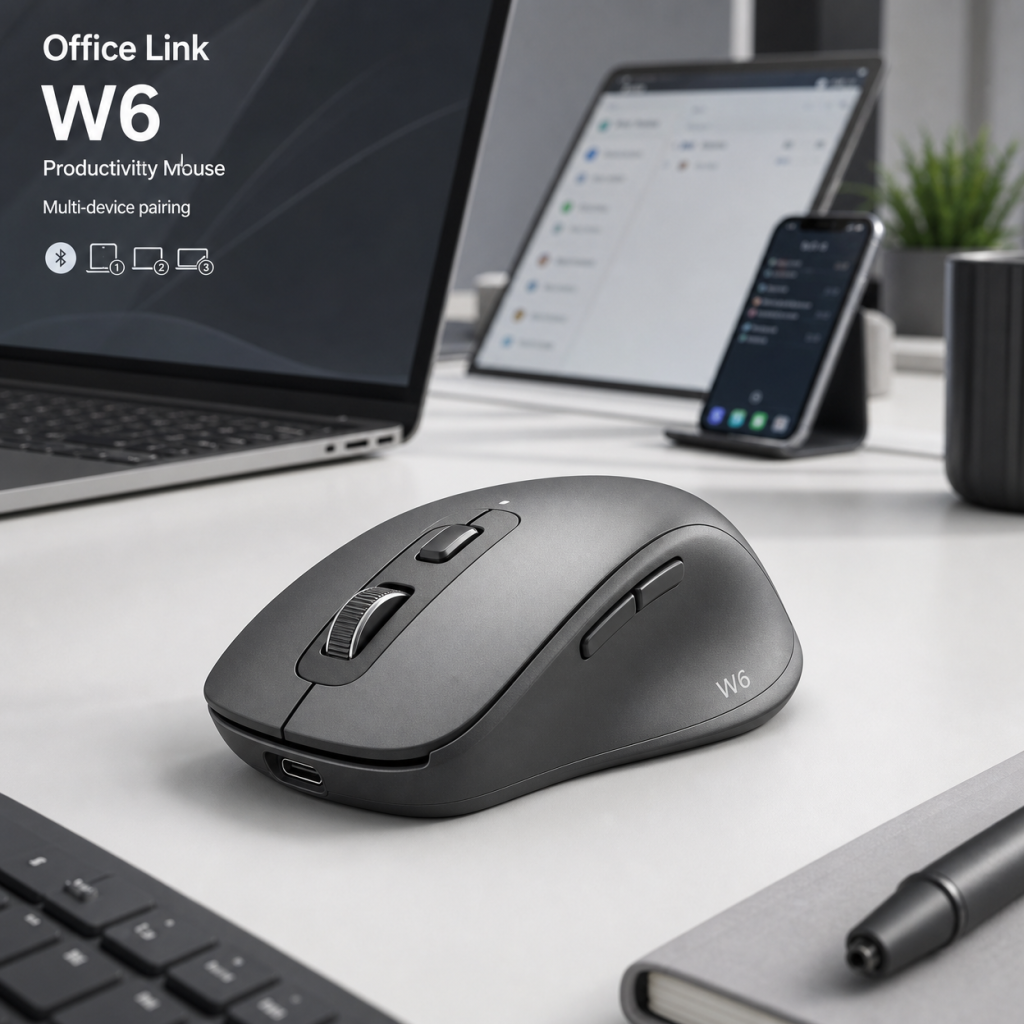
The Office Link W6 Productivity Mouse features a refined, professional aesthetic that fits naturally in any work environment. The clean lines and understated color palette communicate competence and quality without unnecessary flash — a mouse that looks as professional as the work you do with it.
At 78–98g with battery, the Office Link W6 Productivity Mouse achieves an ideal balance between heft and portability. It’s substantial enough to feel premium and controlled under your palm, yet light enough to slip into a laptop bag or briefcase without adding noticeable weight to your daily carry. The compact footprint makes it a natural companion for travel and hotdesking scenarios.
Rubberized grip zones on both sides provide secure handling on any surface, preventing the mouse from slipping during rapid movements. The scroll wheel is smooth and responsive, with the right amount of resistance for controlled scrolling through documents and web pages.
Precision Tracking Everywhere
The Office Link W6 Productivity Mouse is powered by the PixArt PMW-3335 High-Precision Optical Sensor, delivering accurate and smooth tracking across the surfaces you actually work on — whether that’s a cloth mouse pad, a wooden desk, a glass conference table, or even your lap in a pinch. With 200–4,000 DPI (5 adjustable levels), you can match the sensitivity to your screen size and personal preference.
The sensor’s surface-independence is particularly valuable for professionals who work in varied environments. You shouldn’t need to carry a mouse pad everywhere, and with the Office Link W6 Productivity Mouse, you don’t have to. The sensor adapts to and performs consistently on nearly any surface it encounters.
Polling rate options of 125Hz wireless / 1000Hz wired mode allow you to optimize either for maximum responsiveness during intensive work sessions or for extended battery life during lighter use, giving you control over the trade-offs that matter to your specific workflow.
Reliable Clicks, Day After Day
The Office Link W6 Productivity Mouse is equipped with Kailh GM 8.0 switches (rated 80 million clicks), delivering consistent, confident click feedback with each actuation. The switches are rated for tens of millions of click cycles, ensuring that the mouse remains as responsive on day one thousand as it was on day one.
The 6 programmable buttons with auto-sleep function include programmable side buttons that can be configured for browser navigation, application switching, copy/paste shortcuts, or any function that reduces repetitive keyboard-to-mouse transitions in your workflow. Small efficiency gains compound significantly over the course of a full workday.
The scroll wheel provides smooth, accurate scrolling through long documents and web pages, with a tilt function for horizontal navigation where supported. The wheel’s tactile feedback gives reliable control for both rapid document skimming and precise line-by-line scrolling.
Wireless Freedom, Wired Reliability
The Office Link W6 Productivity Mouse uses a USB-C Charging Cable (1.8m) + USB Nano Receiver to deliver a rock-solid 2.4GHz wireless connection with near-zero latency. The compact USB nano receiver can remain plugged into your laptop permanently without risk of breakage, thanks to its low-profile design. Connection is automatic — pick up the mouse, and it’s ready to use.
For situations where wireless isn’t ideal — long presentations, battery-low scenarios, or wired-only office policies — the USB-C cable provides immediate wired operation while also charging the battery. This dual-mode capability means you’re never truly without a connection option.
The Pure PTFE Glide Feet ensure consistent, smooth movement across all desk surfaces, contributing to the effortless, frictionless feeling that makes the Office Link W6 Productivity Mouse a pleasure to use throughout the workday.
Simple Setup, Smart Features
The Office Link W6 Productivity Mouse works immediately without any software installation, using plug-and-play defaults that suit most users right away. For those who want deeper customization, the optional companion software provides button remapping, DPI adjustment, profile management, and battery level monitoring from a clean, intuitive interface.
The auto-sleep function activates after a configurable idle period, significantly extending battery life without requiring manual intervention. Wake-from-sleep is instantaneous — a single click brings the mouse back to full activity with no perceptible delay.
For IT administrators in managed office environments, the Office Link W6 Productivity Mouse’s compatibility with standard USB HID drivers means no special driver deployment is required, simplifying large-scale adoption across organizational fleets.
Who Benefits Most from the Office Link W6 Productivity Mouse?
The Office Link W6 Productivity Mouse is the ideal choice for remote workers who move between home offices and coworking spaces, business travelers who need reliable peripherals on the go, and office workers who want to declutter their desks by eliminating mouse cables from their workspace.
Executives and managers who frequently present in conference rooms will find the wireless freedom invaluable for controlling presentations from a distance. Students and academics who work across multiple study locations will appreciate the reliable performance and portability combination.
For anyone transitioning from a wired mouse to wireless for the first time, the Office Link W6 Productivity Mouse offers the most seamless possible experience — the connection is so stable and the latency so minimal that you’ll quickly forget it’s wireless at all.
Technical Specifications
| Specification | Details |
|---|---|
| Sensor | PixArt PMW-3335 High-Precision Optical Sensor |
| DPI Range | 200–4,000 DPI (5 adjustable levels) |
| Polling Rate | 125Hz wireless / 1000Hz wired mode |
| Primary Switches | Kailh GM 8.0 switches (rated 80 million clicks) |
| Weight | 78–98g with battery |
| Cable / Connection | USB-C Charging Cable (1.8m) + USB Nano Receiver |
| Mouse Feet | Pure PTFE Glide Feet |
| Buttons | 6 programmable buttons with auto-sleep function |
Cut the Cord on Productivity Compromises
The Office Link W6 Productivity Mouse proves that wireless and professional-grade performance are not mutually exclusive. With its reliable 2.4GHz connection, long-lasting battery, precision sensor, and thoughtful design, it delivers everything you need from a daily-driver productivity mouse — without the cable.
In a world where flexibility and mobility are increasingly core to how we work, the Office Link W6 Productivity Mouse is the mouse that keeps pace with your dynamic professional life. From the boardroom to the home office to the airport lounge, it performs consistently, comfortably, and reliably.
Make the wireless upgrade today. The Office Link W6 Productivity Mouse is the last mouse cable you’ll ever miss.
